

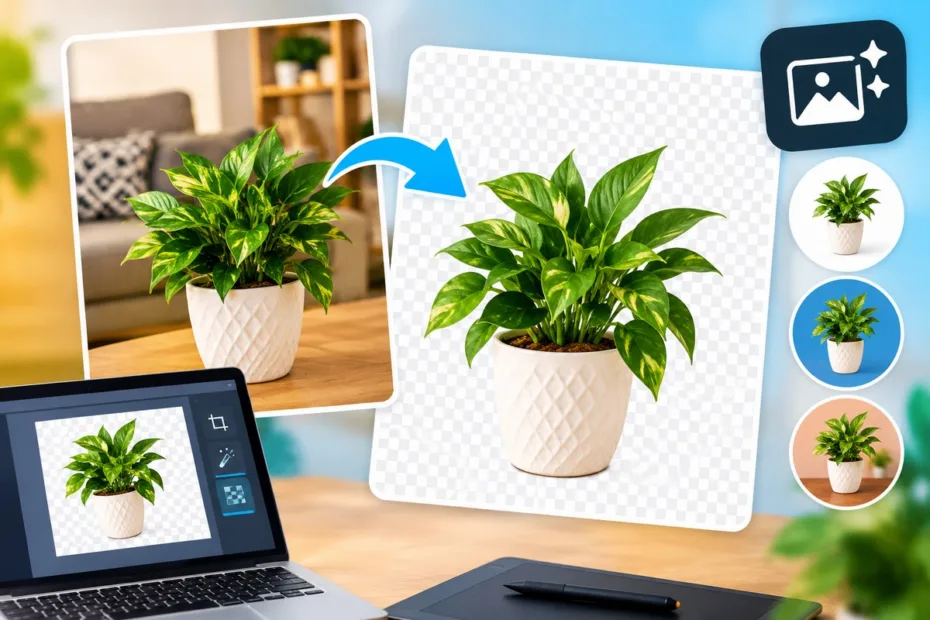
Images play an important role in how people understand and interact with digital content. From blog illustrations and online stores to social media graphics and business presentations, clear visuals can make information easier to understand and more appealing to an audience. However, even a well-composed photograph can become difficult to use when its background contains distracting objects, inconsistent colors, or unnecessary details.
Image background removal offers a practical solution. By separating the main subject from its surroundings, creators can prepare images for different purposes without needing to arrange a new photoshoot every time they change a design. Understanding when and how to use this technique can help individuals and businesses produce more consistent visual content.
Why Backgrounds Matter in Digital Images
A background does more than fill the empty space behind a subject. It influences visual balance, directs attention, and helps establish the overall mood of an image. A cluttered background can compete with the main subject, while a carefully selected one can make the intended message clearer.
For example, a product photograph taken at home may include furniture, personal belongings, or uneven lighting. These details can distract potential customers from the product itself. Similarly, a profile photograph intended for a professional presentation may look inconsistent when placed alongside images with different backgrounds.
Removing unnecessary background elements allows creators to control the final composition more effectively. They can place the subject against a plain color, a branded design, or a relevant setting that supports the purpose of the content.
Common Uses of Image Background Removal
Background removal is useful across several areas of digital communication. The best approach depends on the subject, the intended audience, and where the finished image will appear.
Product Photography and Online Stores
Online shoppers often compare several products before making a purchase. Consistent product images make this process easier by allowing customers to focus on the item’s shape, color, features, and details.
Removing distracting backgrounds can help sellers create a uniform appearance across product catalogs. For instance, a small business selling shoes, accessories, or home decorations can display different items against a consistent background without photographing every product in an identical physical setting.
However, sellers should preserve accurate product colors and proportions. Shadows and other visual details may also be important because they help customers understand the item’s dimensions and appearance.
Social Media and Marketing Graphics
Social media content often needs to communicate an idea quickly. Whether a creator is designing an announcement, promotional graphic, educational carousel, or video thumbnail, separating a person or object from its original background creates more flexibility.
A cutout image can be combined with typography, illustrations, colored shapes, or other visual elements. This approach is particularly helpful when creating multiple designs for different campaigns while maintaining a recognizable brand style.
The key is to avoid adding so many decorative elements that the original message becomes difficult to understand.
Presentations and Educational Materials
Teachers, trainers, and business professionals frequently use images to explain concepts. An isolated object can help direct attention to a particular feature, especially when a slide contains several pieces of information.
For example, a presentation about camera equipment may use separate images of a lens, tripod, and microphone. Removing their original backgrounds can make it easier to arrange the objects neatly on one slide.
This technique can also support instructional diagrams, training documents, and digital learning resources where visual clarity matters more than decorative complexity.
How AI Makes Background Removal More Accessible
Traditional background removal often involves manually selecting an object’s edges, adjusting masks, and refining small details. Although this method provides precise control, it can take considerable time, particularly when an image contains hair, transparent objects, or complicated outlines.
AI-powered tools can simplify the initial selection process. They analyze visual differences between the main subject and its surroundings to estimate which areas should remain and which should be removed. Depending on the image and tool, this process may take only a short time.
Creators looking for a straightforward way to prepare images can use a remover fundo de imagem tool to separate a subject from its background before adding it to a new design.
Automation is useful, but it does not guarantee a perfect result. Image quality, lighting, subject complexity, and the contrast between foreground and background can all affect the outcome. Reviewing the finished image remains an important part of the process.
A Practical Workflow for Better Results
A reliable workflow can reduce editing mistakes and make images easier to reuse across different platforms.
1. Start With a Clear Source Image
Whenever possible, use an original photograph with good lighting and a clearly visible subject. Images with excessive blur, heavy compression, or poor contrast may produce less accurate selections.
The subject does not always need a completely plain background, but a clear separation between the subject and its surroundings generally makes editing easier.
2. Remove the Background
Upload the image to a suitable editing tool and allow the software to identify the main subject. Examine the initial result before using the image elsewhere.
Pay particular attention to fine details such as hair, fingers, leaves, thin wires, and curved edges. These areas can be difficult for automated systems to distinguish from the background.
3. Inspect Edges and Missing Details
Zoom in to check whether parts of the subject have disappeared or unwanted background fragments remain. If the editor provides manual refinement tools, use them to correct visible problems.
For professional product images, even small edge defects may become noticeable when the image is placed against a contrasting color. A quick review can prevent these imperfections from appearing in the final design.
4. Choose an Appropriate New Background
A transparent background provides flexibility because the subject can be placed over different colors, photographs, or graphic layouts. Alternatively, a solid background may be more appropriate for product catalogs, identification materials, or simple promotional designs.
Choose a replacement that supports the image’s purpose. A busy background can introduce the same distractions that the original editing process was intended to remove.
5. Export the Image in the Correct Format
The final file format matters. PNG is commonly used when transparency needs to be preserved, while JPEG is suitable for many photographs with a solid background. WebP can also be useful for web publishing when supported by the intended platform.
Before exporting, check the image dimensions, resolution, and file size. A large image may be appropriate for print, whereas a smaller optimized file can improve loading performance on a website.
Mistakes to Avoid When Editing Images
Although background removal is relatively accessible, several common mistakes can reduce the quality of the finished image.
Ignoring natural shadows: Removing every shadow can make an object appear disconnected from its surroundings. Depending on the design, retaining or recreating a subtle shadow may improve realism.
Overlooking fine edges: Rough outlines around hair, clothing, or transparent materials can make an edited image look artificial. Inspecting the subject at a larger scale helps identify these problems.
Using inconsistent image styles: A website may look less professional when some product images have white backgrounds, others have dark backgrounds, and the remaining images use unrelated colors. Establishing simple visual guidelines can improve consistency.
Reducing image quality unnecessarily: Repeated compression and exporting at very small dimensions can make photographs look blurry. Keep a high-quality original file and create optimized copies for different uses.
Forgetting accessibility: When images communicate meaningful information, provide appropriate alternative text on websites. Alt text should describe the image’s relevant content rather than simply listing its visual appearance.
Balancing Automation With Human Creativity
Automated editing can reduce repetitive work, but it should support rather than replace creative decisions. A technically clean cutout may still look unsuitable if its lighting, scale, or placement conflicts with the rest of a design.
Creators should consider how the image fits into the complete composition. A product may need a realistic shadow, a portrait may require careful color correction, and an educational illustration may benefit from labels that explain important features.
It is also important to respect image ownership and privacy. Before editing or publishing photographs of other people, confirm that their use is permitted and that any necessary consent has been obtained. Commercial projects should also follow the relevant licensing terms for source images and editing tools.
Conclusion
Image background removal is a practical technique for creating clearer, more adaptable visual content. It helps online sellers maintain consistent product photography, enables marketers to develop flexible graphics, and allows educators to build more focused presentations.
The best results come from combining suitable source images, reliable editing tools, careful edge inspection, and thoughtful design choices. By treating background removal as one step in a broader visual workflow, creators can produce images that are not only cleaner but also more useful, accessible, and appropriate for their intended audience.

James Silva é fundador e editor do M&A Arts, blog de referência em artesanato e decoração no Brasil. Com formação em Administração (Instituto Paula Souza) e Belas Artes (Faculdade Cruzeiro do Sul), desenvolve conteúdos que combinam criatividade, técnica e praticidade — do macramê à resina, do biscuit à reciclagem criativa. Seu trabalho é voltado para quem quer aprender, criar e se inspirar no universo Diy.